 By Marcus Bell
Editor-in-Chief
How to Check Supreme Coupons Before Checkout
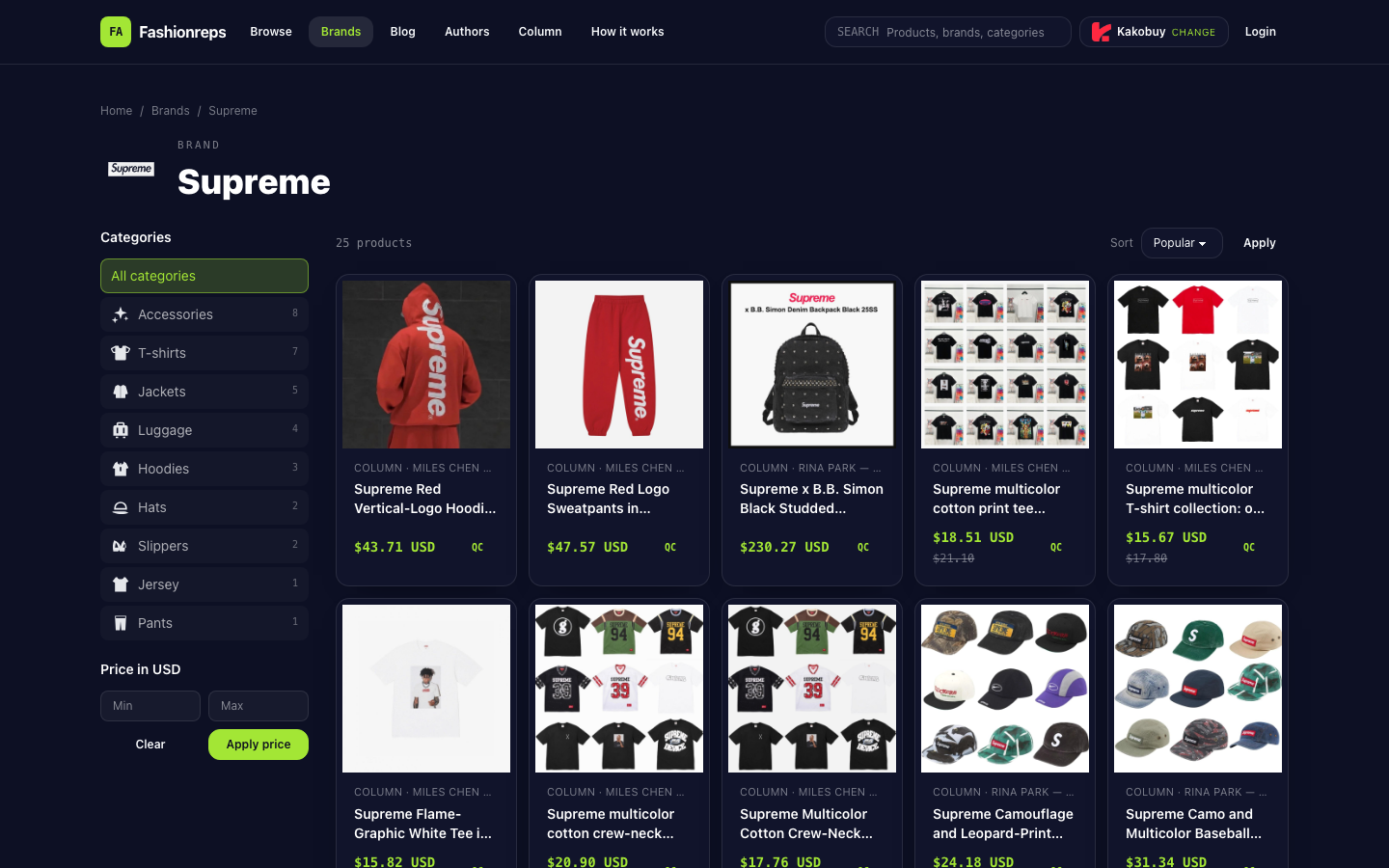
Before placing an order on the Supreme brand page on Fashionreps, you currently cannot confirm whether a coupon is applicable just from the product page. The verified page displays product categories, reference prices, and a purchase platform selection entry, but it does not show currently valid coupon codes, minimum spend,
Editor score 4.2 / 5

Before placing an order on the Supreme brand page on Fashionreps, you currently cannot confirm whether a coupon is applicable just from the product page. The verified page displays product categories, reference prices, and a purchase platform selection entry, but it does not show currently valid coupon codes, minimum spend, excluded items, stacking order, validity period, or checkout discount results.
Therefore, the correct pre-payment judgment is not "a coupon can definitely be used if the page shows a reference price," but rather to check the product page, coupon description, and final checkout page item by item. As long as one of these items lacks current evidence, you should not treat the estimated discount as the actual savings amount.
First, confirm which item you are checking
The Supreme brand page currently displays 25 items, including T-shirts, jackets, hoodies, hats, bags, pants, jerseys, and slippers. The page also shows reference prices for different items; for example, some T-shirts, hats, and jackets are listed with reference prices in US dollars.
This information only helps confirm the item and page price; it does not prove that a particular item meets the coupon conditions. Before ordering, record the following:
- Item name and product page URL
- Color, size, or other variant
- Unit price and currency shown on the page
- Selected purchase platform or agent entry
- Date and time of coupon check
If the same item has multiple color, size, or set options, do not record only the series name. Coupon restrictions may be determined by specific variant, set, or item number; when current evidence does not specify, you cannot assume the entire series is eligible.
Check coupon conditions with five items
1. Is the coupon entry valid?
Only obtain coupons from entries that can be opened in the current purchase process, and confirm that the page can display the coupon name, status, or applicable description. If the page only has promotional text, old screenshots, or an entry that cannot be opened, do not treat it as a currently valid coupon code.
As of this check, the provided Supreme brand page evidence does not show any redeemable Supreme-specific coupon, nor does it provide a verifiable current coupon code. Therefore, this article does not list any discount code or estimated savings amount.
2. What amount is used to calculate the minimum spend?
If the coupon description states a minimum spend, confirm whether the threshold is calculated on the product subtotal, discounted subtotal, or order total including shipping and other fees. At checkout, at least record:
- Product subtotal before coupon
- Minimum amount required by the coupon
- Whether shipping, tax, or service fees are excluded
- Whether the threshold is still met after applying other discounts
Do not treat the single item reference price on the brand page as the order amount that meets the threshold. The reference price shown on the page is display information and cannot replace the subtotal on the checkout page.
3. Does the exclusion apply to this item?
Check whether the coupon description excludes the following:
- Supreme brand or specific product lines
- Already discounted items
- Specific colors, sizes, sets, or variants
- Accessories, bags, shoes, or other specific categories
- Pre-orders, limited editions, or special event items
The currently provided brand page only shows product categories and reference prices, and does not show any coupon exclusion list. Therefore, you cannot determine that an item is eligible for a coupon just because "Supreme" appears in the item name, the category name, or the presence of a price comparison on the page.
4. Is the stacking order clear?
If store discounts, platform coupons, shipping discounts, or payment method discounts are available simultaneously, confirm whether they can be stacked and the order of application. Pay attention to whether the coupon description clearly states:
- Whether only one coupon can be used
- Whether it can be combined with product discounts
- Whether the discount is calculated on the original price or the discounted price
- Whether shipping discounts are calculated independently
- Whether the coupon needs to be manually selected at checkout
When there is no current description, do not simply multiply percentages to estimate the final price. Different discounts may have different calculation orders, and the provided source does not give stacking rules.
5. Do the validity period and currency match?
Record the start time, end time, time zone, and applicable currency displayed for the coupon. If the coupon is displayed in another currency or region, confirm whether the checkout page uses the same currency.
The current Supreme brand page reference prices are in US dollars, but this does not mean the coupon is necessarily calculated in US dollars, nor that shipping, tax, or payment will use the same amounts. Neither the currency nor the validity period has been confirmed on the verified page.
Confirm the actual discount on the checkout page
After completing the first four checks, add the item to your cart and proceed to the checkout page. Do not pay immediately upon seeing the coupon name; check in the following order:
- Confirm that the item name, variant, and quantity in the cart match your records.
- Record the product subtotal before applying the coupon.
- Select or enter the coupon, and confirm that the page shows it as applied, not just selectable.
- Record the discount amount, change in product subtotal, and final amount due.
- Check separately whether shipping, tax, service fees, or other additional charges have changed.
- Check whether the coupon is automatically removed by the system, shown as inapplicable, or requires item replacement.
- Save a screenshot of the checkout page before payment, ensuring it includes the item, coupon name, discount amount, and final amount.
The actual discount should be based on the amount clearly shown on the checkout page. The reference price on the brand page, old prices in search results, or example amounts in the coupon description cannot replace the checkout page result.
What current evidence can and cannot confirm
The source of this check is the Supreme brand page on Fashionreps, checked at 10:44 on October 25, 2026. The page supports the following facts:
- The Supreme brand page lists 25 items.
- The page provides multiple product category filters.
- The page displays reference prices in US dollars for some items and some previous reference prices.
- The page contains a purchase platform selection entry.
The page cannot support the following conclusions:
- There is currently a usable Supreme coupon or coupon code.
- A specific item meets a certain minimum spend threshold.
- Supreme items are not excluded from the coupon.
- Multiple coupons or other discounts can be stacked.
- A certain discount is valid before a specified date.
- A specific discount amount will definitely be applied at checkout.
What to do if there is no coupon code or rules
If the coupon entry cannot be opened, the coupon description is missing, or the checkout page does not show an actual discount, pause payment. Contact customer service of the current purchase platform with the item name, variant, cart subtotal, and coupon screenshot, and ask them to clearly answer:
- Whether this item is eligible for the coupon
- Which amount field is used to calculate the minimum spend
- Whether Supreme or this item variant is excluded
- Whether it can be stacked with other discounts
- How the coupon's validity period, currency, and final discount amount are displayed
Before customer service confirmation, do not fill in an unverified discount amount yourself, and do not assume the order meets coupon conditions just because the brand page shows a reference price. If customer service cannot confirm, the safest approach is to save the current checkout record, pause payment, and wait for a verifiable coupon description or checkout page result.