 By Marcus Bell
Editor-in-Chief
hello kitty Headphone QC: Check Earcups, Ports, Packaging
Introduction If you're about to let an agent ship, don't just look at whether the photos have hello kitty patterns. The headphone's appearance, ports, and packaging accessories must correspond item by item to the specific variant selected in the order. QC photos can only prove what is actually captured in the photo, and cannot replace testing for sound quality, battery life, authenticity, or long-term durabilit
Editor score 4.2 / 5
Introduction
If you're about to let an agent ship, don't just look at whether the photos have hello kitty patterns. The headphone's appearance, ports, and packaging accessories must correspond item by item to the specific variant selected in the order. QC photos can only prove what is actually captured in the photo, and cannot replace testing for sound quality, battery life, authenticity, or long-term durability.
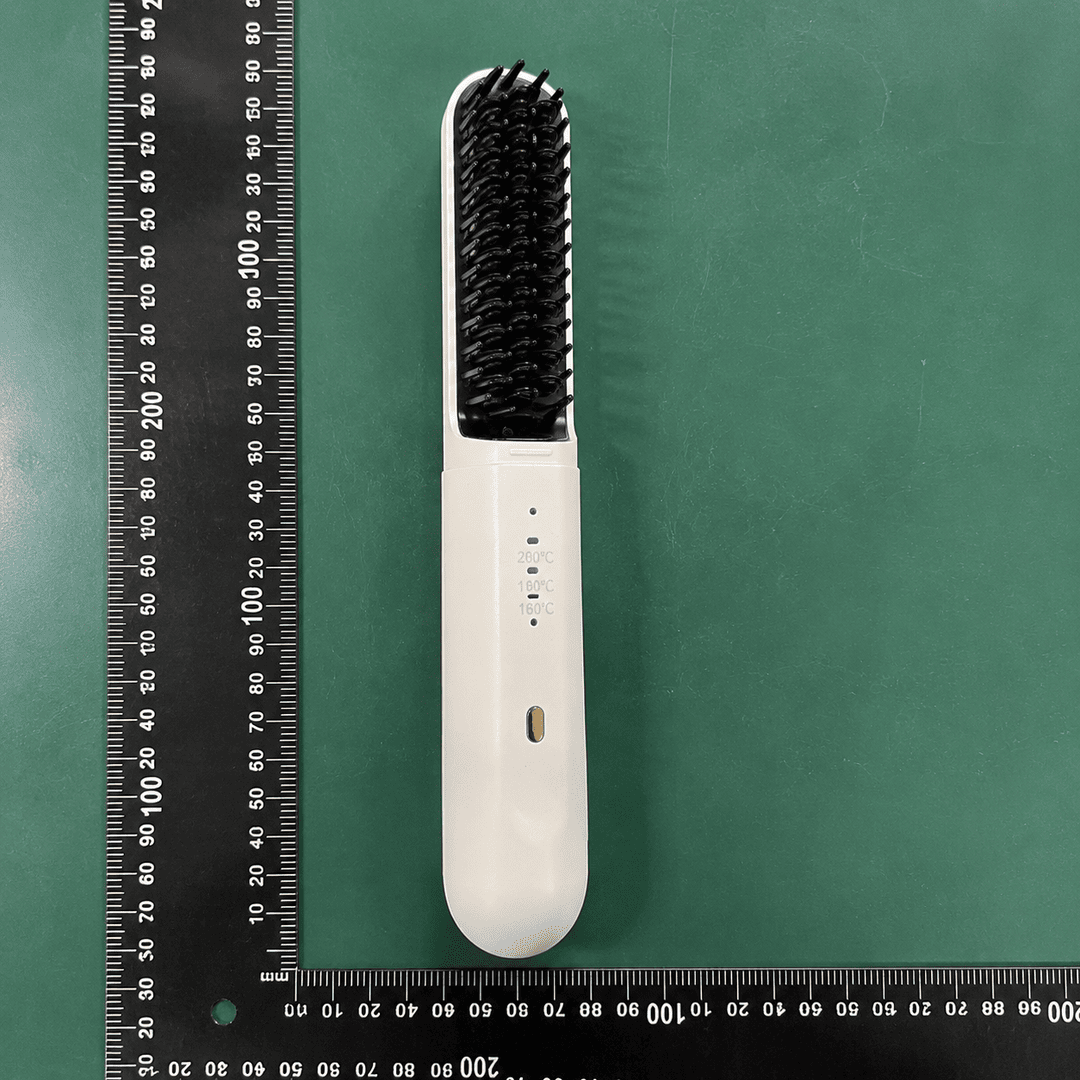
The QC page that can be verified this time has obvious object inconsistency: the provided page title and page evidence point to a "white heating straightening comb", SKU SPU-020V0FA3L8, not a hello kitty headphone. Therefore, the following process can be used as a pre-shipment checking method, but the images on that page cannot be treated as real QC evidence for this headphone. It is recommended to pause shipment until the object is confirmed.
First confirm which product the images actually correspond to
After entering the product details page, first check the following information:
- Whether the product name clearly states hello kitty headphones.
- Whether the color, style, or variant selected in the order matches the current selection on the details page.
- Whether the shape of the earcups or stems in the images matches the structure in the product details.
- Whether the accessories listed on the page include charging cable, storage accessories, instruction materials, or other included items.
- Whether the product model, SKU, or variant number can correspond to each other in the QC images or page information.
After confirming the details page, click "View QC Photos" on the page to enter the QC gallery for that product. Do not guess the QC address based on the product name, and do not treat category pages, brand pages, product main images, or images of other products as QC photos.
Check the headphone body in order
1. First look at the overall shape and left-right correspondence
Observe whether the left and right earcups, stems, or connecting parts are complete, and whether the outer contour matches the target variant. Focus on recording the color, size ratio, decorative patterns, and obvious bumps that are actually visible in the photos; if a certain side is not photographed, it should be recorded as "cannot be confirmed from existing photos" rather than assuming there is no problem by default.
The hello kitty pattern needs to be checked separately for position, color, and completeness. You can determine whether the target decoration appears in the image, and whether there is obvious misalignment, color fading, or scratches, but you cannot judge product authenticity based solely on the pattern.
2. Check the headband, hinges, and connection points
Check whether the connection between the headband and earcups has breaks, obvious misalignment, or assembly gaps. If the QC photos only show the front, the inner side of the headband, hinges, and the other side's connection points are still uncovered areas, and you should request additional photos rather than inferring overall condition from front photos.
3. Check buttons, indicator lights, and charging port
The port must be clearly identifiable in the photos. Check the port shape, position, and whether the surrounding housing has cracks or obvious burrs, and confirm that the position of buttons and indicator lights matches the target style. If the port is blocked, the image is too dark, or the resolution is insufficient, it should be added to the list for additional photos.
Photos cannot prove whether the port can charge normally, nor can they prove that buttons, Bluetooth connection, or indicator lights are definitely working. Unless there is clear functional test evidence, only visible appearance can be recorded.
Then check packaging and accessories
Compare the accessories in the QC photos item by item with the accessories fields on the product details page. Focus on whether the following are photographed:
- Charging cable and both ends of its connector.
- Instruction materials or paper accessories inside the packaging.
- Storage pouch, protective case, or other accessories clearly listed on the page.
- Whether the outer packaging, inner tray, and product body belong to the same set.
If the page only says "includes accessories" but does not clearly list specific contents, do not add accessory names on your own. If the photos do not show the inside of the packaging or a full view of accessories, it can only be stated that "existing photos do not cover it", not a conclusion of missing items.
Record evidence and judgments separately
It is recommended to divide the inspection results into three categories:
- Visually observable facts in photos: for example, one side of the earcup shows pink housing, the port position is visible, and one cable is photographed in the packaging.
- Unidentifiable from photos: for example, port model is blurred, the other side of the earcup is not photographed, or the inside of the packaging is blocked.
- Editorial judgment: for example, need to request close-up photos of the port, or suspend shipment due to product object inconsistency.
This recording method avoids mistaking "not photographed" as "no problem", and helps the agent know exactly which photos need to be supplemented.
Conclusion under current evidence
The currently provided QC evidence page shows a white heating straightening comb, SKU SPU-020V0FA3L8, while this article needs to check a hello kitty headphone. Due to product object inconsistency, we cannot confirm the headphone's earcups, port, decorative pattern, packaging, or accessories based on this.
Before obtaining the correct product details page and the headphone QC gallery entered via its "View QC Photos", it is recommended to suspend shipment and request the following additional photos:
- Front, back, left and right sides of the headphone, and headband connection points.
- Clear close-up photos of the charging port, buttons, and indicator lights.
- Detail of the hello kitty decorative pattern.
- Product model, variant markings, or markings that can correspond to the order.
- Inside of the packaging, charging cable, and all accessories listed on the page.
Only after these photos actually correspond to the selected hello kitty headphone variant can QC checks on appearance and accessories continue. Even if all photos match, it only means that the photo evidence corresponds to the order information, and cannot be used to make guarantees of authenticity, sound quality, battery life, or long-term quality.

Article image