 By Marcus Bell
Editor-in-Chief
Fixing Supreme Hoodie Checkout Cost Issues on FashionReps
Introduction If after adding a Supreme fall/winter hoodie to your cart, the checkout amount doesn't match the reference price shown on the product page, don't pay immediately, and don't repeatedly submit the order. The amount change may come from quantity, specifications, service fees, payment fees, packaging fees, international shipping, discount conditions, or exchange rates, and does not necessarily mean the product
Editor score 4.2 / 5
Introduction
If after adding a Supreme fall/winter hoodie to your cart, the checkout amount doesn't match the reference price shown on the product page, don't pay immediately, and don't repeatedly submit the order. The amount change may come from quantity, specifications, service fees, payment fees, packaging fees, international shipping, discount conditions, or exchange rates, and does not necessarily mean the product page or checkout system is malfunctioning.
This article addresses only one problem: how to troubleshoot the amount difference between the fashionreps product page and the current checkout entry. After completing the verification, you should be able to determine which item the difference comes from, whether you need to reselect conditions, and when to stop and contact official support. This article does not apply to refund disputes after successful payment, warehouse replenishment, or customs tax disputes.

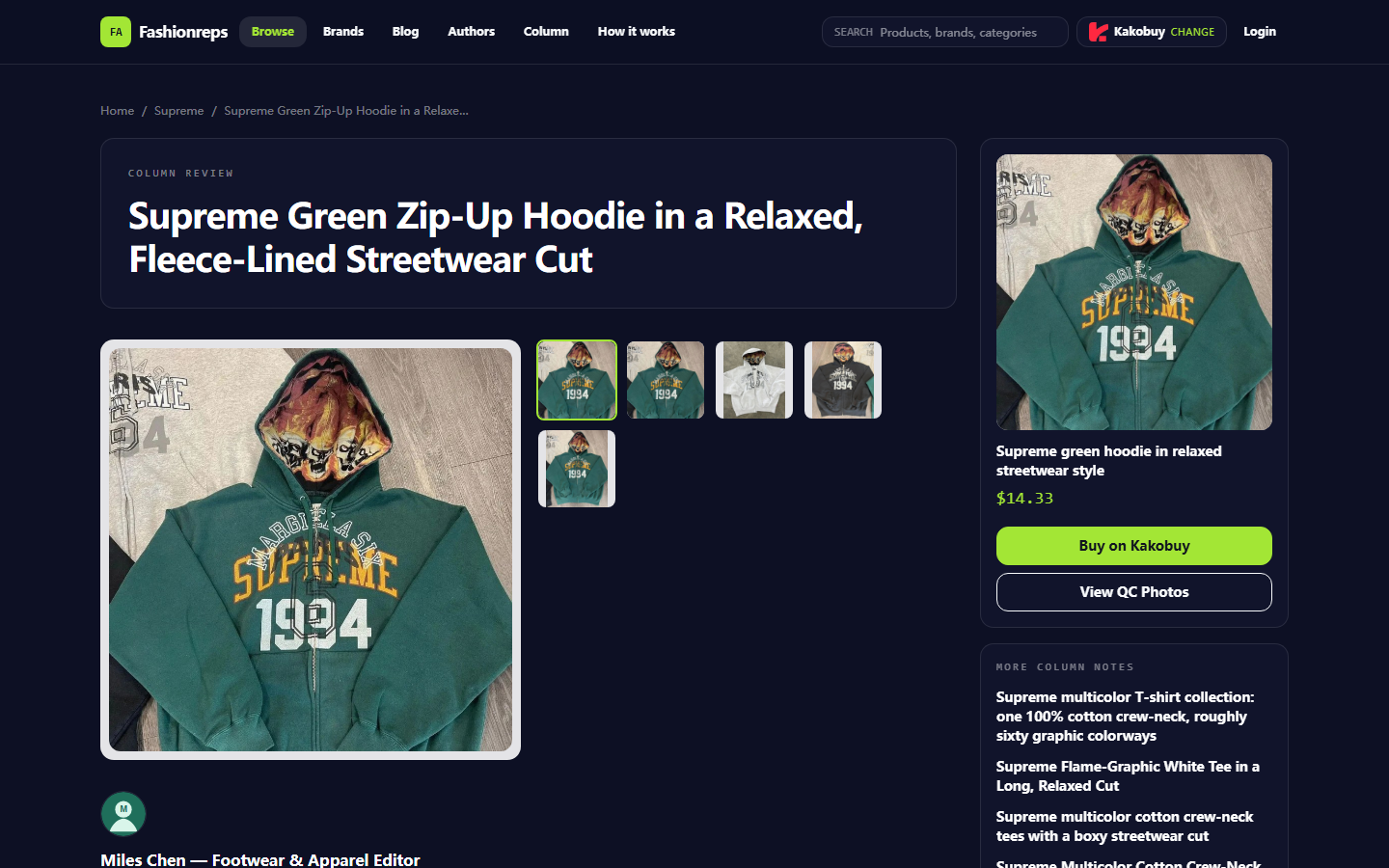
Image: Reference information of the Supreme green zip-up hoodie on the product page. The image is from the fashionreps product page record; the public product page information and checkout amount still need to be verified separately.
Define the single issue of Supreme hoodie checkout amount discrepancy
First, record the specific location where the discrepancy appears:
- The reference price shown on the product page differs from the cart subtotal;
- The cart subtotal differs from the product amount on the checkout page;
- The product amount is the same, but the final amount due has increased;
- After selecting color, size, or quantity, the amount is recalculated;
- The checkout page shows service fees, packaging fees, payment fees, or shipping fees that were not previously displayed.
Do not just record "more expensive" or "amount is wrong." Record the product amount, quantity, fee names, currency, exchange rate display, discount amount, and final amount due separately. If the page only shows a total, save a screenshot of the page or transcribe the current numbers before continuing to check.
According to the existing product page record, the reference price for this Supreme green zip-up hoodie is $14.33, and the page also shows a final product price hint of $15.97. This information can only serve as a sample from the product page and cannot be directly regarded as the final amount due in the current cart or checkout page. Product prices, inventory, specifications, and fees may change over time, by region, agent platform, and account conditions.
Reopen the fashionreps product page and the current checkout entry
First, close the old cart or checkout tab, and then re-enter the purchase entry from the product page. Old pages may retain outdated specifications, quantities, regions, or exchange rate states.
After reopening, confirm in order:
- Is the product name still Supreme green zip-up hoodie, not a similar style or other color?
- Does the page still display visible information such as product name, color, size, and reference price?
- Does the purchase entry redirect to your currently selected shopping agent platform?
- Is there only this one item in the cart, and is the quantity 1?
- Is the checkout currency consistent with the product page reference price?
The fashionreps page will associate purchase entries such as Buy on Kakobuy with your selected shopping agent. Different agents may have different service fees, payment fees, storage rules, and international shipping calculation methods, so you cannot treat the product page reference price as the final price applicable to all agents. If the purchase entry has already switched agents, confirm the current agent name first, then compare amounts.
Verify product price, quantity, and selected specifications
After entering the cart, first keep only the target hoodie to avoid mixing in fees from other items. Then recheck color, size, and quantity.
The product page record shows that this hoodie publicly lists colors such as green, black, and light grey, and offers sizes ranging from S to XXXL. The page also has inconsistencies in fabric and hood style fields: one place says viscose fabric, while the composition field shows 100% polyester; the collar field shows hooded, while another field shows no hood. These information contradictions do not automatically prove that the checkout amount is wrong, but they indicate that you should confirm specific specifications before ordering to avoid recalculation or subsequent disputes due to incorrect options.
Focus on checking the following items:
- Is the color selected green, not the default color?
- Is the size the one you plan to purchase?
- Was the quantity increased by an old cart or page refresh?
- Are there different sellers, different links, or different variants?
- Are there required notes, customization options, or specification surcharges?
- Does the product page show the reference price, starting price, or a specific specification price?
If the amount changes after reselecting specifications, first confirm whether it is a specification price difference or the page added the item repeatedly. Do not click purchase repeatedly or add to cart again when the cause is unclear.
Separate service fees, payment fees, packaging fees, and shipping fees
After confirming the product amount, expand the checkout fees item by item. Do not attribute all differences to "shipping."
| Checkout item | What to verify | Common way to determine |
|---|---|---|
| Product amount | Unit price, quantity, specifications | Correspond item by item with the product line in the cart |
| Service fee | Agent service or processing fee | Check if it is charged per order, per item, or as a percentage |
| Payment fee | Fees from payment channel or currency conversion | Check fee name, currency, and payment method |
| Packaging fee | Reinforcement, special packaging, or repackaging | Confirm whether you actively selected additional services |
| International shipping | Package weight, dimensions, route, and destination country | Check chargeable weight, route, and applicable region |
If you purchase only one hoodie, the international shipping may be significantly higher than the product itself, but this does not mean the product price has been modified. Shipping can only be accurately calculated after weight, packaging method, destination country, and shipping route are determined. If the page mixes estimated shipping and final shipping, retain both amounts and their display stages.
Consolidated shipping cannot be assumed to be cheaper either. It may reduce repeated first weight or some operational costs, but it may also increase volumetric weight, package declared value, or one-time loss risk. Split shipping may increase fixed fees but may be appropriate for route restrictions or reduce single-package risk. Without package weight, dimensions, route, and fee details, you should not claim that a certain plan will definitely save money.
Check whether discount conditions, exchange rates, and regional restrictions have changed
After confirming the fee composition, check whether the amount is affected by condition changes:
- Has the coupon expired, not reached the minimum amount, or is limited to certain products?
- Does the discount only apply to a specific agent, payment channel, or new user accounts?
- Is the page displaying US dollars, RMB, or another currency?
- Is the exchange rate used on the checkout page different from the product page display?
- Does the destination country, delivery region, or shipping route trigger restrictions?
- Are you logged into a different account than the one used for the original cart?
- Have you selected tax-inclusive, prepaid tax, or other region-specific options?
Exchange rate differences should be recorded separately from fee differences. If the product page displays in US dollars and the payment page settles in local currency, write down both currencies clearly before comparing corresponding amounts. Do not judge a price increase solely by the number size, and do not use false declaration information, split orders to avoid taxes, or evade inspection methods to lower the amount.
Compare amounts before and after checkout and record query time
It is recommended to use a simple difference record:
Product page reference price: ____
Cart product subtotal: ____
Service fee: ____
Payment fee: ____
Packaging fee: ____
International shipping or estimated shipping: ____
Discount amount: ____
Checkout page final amount due: ____
Currency and exchange rate display: ____
Query time: 2026-10-18, specific time: ____
Take screenshots of the product page, cart, and checkout page separately, retaining product name, fee names, amounts, currency, and page time information in the screenshots. When involving accounts, addresses, phone numbers, order numbers, payment cards, or full waybills, cover personal information first before saving or sending to others.
If the change is only in the shipping estimate before and after checkout, record the chargeable weight, dimensions, route, and destination country. If the product subtotal itself changes, go back to specifications, quantity, seller, and discount conditions to recheck. Change only one condition at a time to avoid switching color, quantity, agent, and payment method simultaneously, which would make it impossible to determine the source of the difference.🧾
Stop conditions when evidence is insufficient or amounts change repeatedly
When the following situations occur, stop paying and repeated submission:
- Product name, color, or size does not match expectations;
- Product amount changes repeatedly without changing specifications and quantity;
- Fee names are unclear and the page does not explain;
- Currency, exchange rate, or destination displayed on the checkout page does not match actual conditions;
- Discount amount disappears without explanation of invalidity;
- After page refresh, duplicate items or duplicate fees appear;
- Purchase entry redirects to a page whose identity or security cannot be confirmed;
- The page requests sensitive information beyond what is needed for normal checkout;
- You cannot confirm whether the final amount due includes international shipping, taxes, or other subsequent fees.
In these cases, do not try to "test out" a lower amount by repeatedly clicking, filling in fake addresses, or splitting orders. This may generate duplicate orders, lock incorrect specifications, or increase subsequent refund and shipping risks. Save current evidence, wait for official page explanation, or consult official support.⚠️
Page evidence to prepare before contacting official support
When contacting support, provide the minimal information needed to reproduce the issue:
- Product page name and the reference price shown on the product page;
- Selected color, size, and quantity;
- Name of the shopping agent currently used;
- Product subtotal, service fee, payment fee, packaging fee, shipping fee, and discount amount;
- Checkout page final amount due and currency;
- Query date and time;
- Screenshots of product page, cart, and checkout page;
- Error messages or fee explanations displayed on the page.
Do not publicly share complete order information, passport, payment card number, account password, complete delivery address, or full waybill. Provide only evidence that is necessary for handling the issue and has sensitive information covered, to official support channels.
If support confirms it is page display delay, fee calculation rule change, or regional condition difference, follow the clear explanation on the current official page and record the verification time again. If support cannot explain the amount, or the final amount still does not match the fee details, pause payment, keep the draft or cart status, and wait for further confirmation.📌
Conclusion
The correct handling order for this type of amount discrepancy is: first confirm the product and specifications, then confirm quantity and agent, then separate service fees, payment fees, packaging fees, and shipping fees, and finally check discounts, exchange rates, and regional conditions. For the sample in this article, the $14.33 reference price and $15.97 product price hint from the product page record cannot directly replace the current checkout page amount.
Only when the product, specifications, fee details, currency, and final amount due all correspond should you continue with payment. If a consolidated shipping plan is expected to save money, you should also specify which fee the savings come from, what package or declaration risks are added, which buyer types it suits, and that it is not recommended when fees cannot be estimated, routes are restricted, or individuals cannot accept single-package loss risk. This article is compiled only from the provided product page record and visible information, and is not presented as an actual purchase, receipt, or real-person test experience.
Article images