 By Marcus Bell
Editor-in-Chief
Filtering Foreign Trade Pants: fashionreps vs Google Sheets
Introduction If you are compiling a batch of foreign trade pants candidates from fashion-reps.net for further verification, the real problem isn't "which page looks better" but how to organize the categories, images, sizes, colors, reference prices, and product links from the site into a candidate list that is easy to compare, review, and collaborate on. This article is for readers who need to filter products first, then decide whether to open the
Editor score 4.2 / 5
Introduction
If you are compiling a batch of foreign trade pants candidates from fashion-reps.net for further verification, the real problem isn't "which page looks better" but how to organize the categories, images, sizes, colors, reference prices, and product links from the site into a candidate list that is easy to compare, review, and collaborate on. This article is for readers who need to filter products first, then decide whether to open the product page or hand it off to a purchaser for review; it's not for treating the site's displayed info as inventory, final price, or quality assurance.

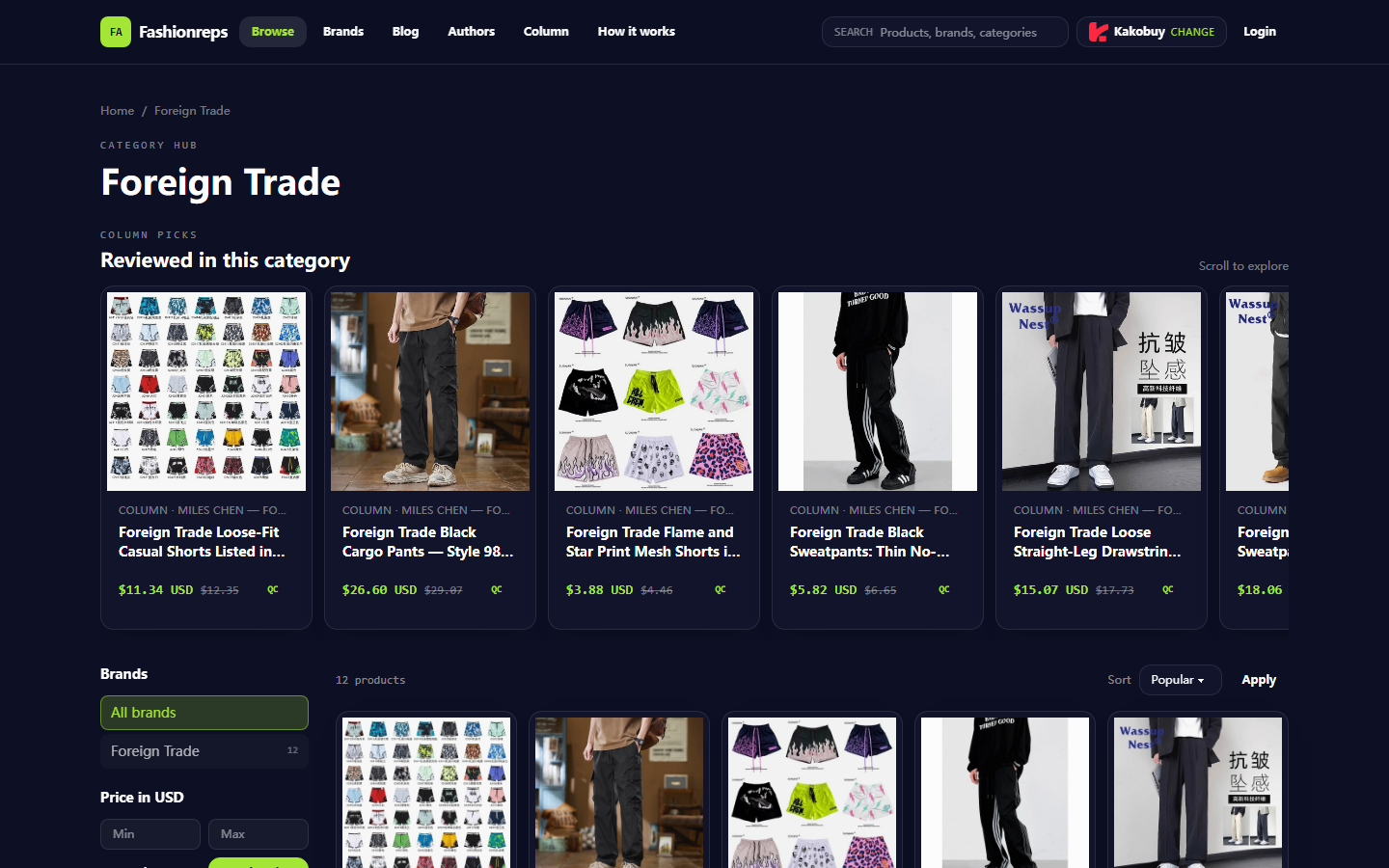
Figure: The foreign trade pants catalog page on fashion-reps.net; page information is subject to actual visible content.
Clarify the foreign trade pants filtering task and device scenario
First, limit the task to one actionable step: find candidates from the foreign trade category that meet style, color, size, and budget requirements, and keep reviewable information for each candidate.
Before filtering, determine the following criteria:
- Do you need long pants, sweatpants, cargo pants, or shorts.
- Are you restricted to black, khaki, army green, or other colors.
- Do you need a specific size range, such as M–3XL or larger size coverage.
- Is the budget based on the product's reference price, or does it need to be determined after factoring in shipping, taxes, and other fees.
- Are you currently using a desktop browser, mobile browser, or a multi-person collaborative spreadsheet environment.
Only initial filtering can be supported by visible page information. Prices, stock, product specs, seller info, and link status may change, so note the verification date when recording, and re-open the product page to confirm before placing an order. 🔎
Check the visible categories, images, and links in the fashionreps site-style spreadsheet
The foreign trade page on fashion-reps.net displays products in a catalog format. The page shows product cards, category names, editorial sections, reference prices, previous reference prices, and some size, color, and material descriptions. The catalog also includes filter entry points and offers visible options for brand, price range, and sorting.
This site-style spreadsheet is better for initial browsing and discovering candidates. You can narrow down the range through categories and product cards, then open specific product pages to verify images, titles, sizes, colors, and product links on the page. Images help quickly distinguish straight-leg pants, cargo pants, sweatpants, and shorts, but images only help identify the appearance shown on the page and cannot prove fabric feel, actual thickness, or fit.
Current catalog candidates include various long pants and shorts, such as black cargo pants, straight-leg sweatpants, drawstring casual pants, pants with fleece options, and shorts in different colors and size ranges. They are suitable as filtering samples and should not be directly interpreted as still in stock or at the same price.
Use Google Sheets to create columns for brand, size, color, and link
When the number of candidates increases, it's recommended to organize browsing results into Google Sheets or another spreadsheet. The value of a spreadsheet is not to replace the product page but to uniformly record fields, reducing repeated opening and information omission during multi-person communication.
You can use the following columns:
| Field | Record content | Purpose |
|---|---|---|
| Product title | Full name as displayed on the page | Distinguish similar styles |
| Category | foreign trade or specific pants type | For later filtering and grouping |
| Color | Colors explicitly listed on the page | Exclude candidates that don't meet requirements |
| Size | Visible size range on the page | Determine if it covers target sizes |
| Material or fit | Descriptions explicitly written on the page | Aid style comparison |
| Reference price | Price and currency shown on the page | Initial budget filtering |
| Product link | Product page link | For easy review and next steps |
| Verification date | Actual date viewed | Identify timeliness of info |
| Review status | To review, reviewed, or not qualified | Manage candidate progress |
If a field is not explicitly written on the page, record "Not shown" and don't fill it in based on images or titles. For example, an image that looks like cotton fabric doesn't mean the page has confirmed the material is cotton; a title with a certain style doesn't mean the product has that function.
Comparing keyword search and filtering steps for the same batch of candidates
The website catalog and Google Sheets solve problems at different stages. The website is better for discovering and verifying original pages; the spreadsheet is better for secondary filtering of recorded candidates.
When browsing the website, you can first use the categories, price filters, and sorting functions in the catalog, then combine natural descriptions in product titles to find candidates. After opening a product card, prioritize verifying the product name, images, sizes, and colors, rather than judging only by the short title in the list.
In Google Sheets, you can use filter views to narrow down by color, size, price, or review status. For example:
- Keep only target colors.
- Filter records containing target sizes.
- Sort by reference price from low to high.
- Hide candidates already confirmed as not qualified.
- Mark records not yet opened as to review.
Search terms should also be specific. Instead of just recording "pants", use natural descriptions like "black cargo pants", "straight-leg sweatpants", "drawstring casual pants" based on the actual task, then return to the product page to verify whether the page actually provides that information. Keywords are only a search tool and cannot replace factual verification. 🧾
Differences between product card browsing and spreadsheet row-column organization
Product cards are good for quickly forming visual judgments: you can see the product image, title, reference price, and some attributes simultaneously, suitable for first browsing to decide which styles are worth further viewing. Its limitation is that information is usually scattered across cards, filters, and product detail pages, making it hard to directly compare multiple candidates on the same fields.
Spreadsheet rows and columns are better for structured comparison. Each product occupies one row, with colors, sizes, prices, links, and verification dates in separate columns, making sorting, filtering, and multi-person collaboration easy. Its limitation is that content depends on entry quality; if the product page updates later and the spreadsheet isn't rechecked, the spreadsheet can fall behind the website.
Therefore, a "website discovery, spreadsheet organization, product page review" sequence is recommended, instead of relying on only one tool. 📊
Record price, specs, and update time only when visible on the target site
Price and specs are highly volatile information. When recording, keep the value displayed on the page that day and note the currency and verification date. Don't automatically interpret previous reference prices as current discounts, or as final costs including international shipping, tariffs, or after-sales costs.
If the page shows a size range, record it as written; if only some sizes are visible, don't assume other sizes exist. Same for colors: color differences, lighting, and compression in images cannot replace the color names explicitly listed on the page.
Link review should at least include:
- Open the product link from the spreadsheet to confirm it doesn't lead to an empty page, error page, or unrelated page.
- Check if the product title matches the one in the spreadsheet.
- Reconfirm price, color, and size information against the page.
- Update the verification date and record changed fields.
- If the page is inaccessible, change the status to to review, rather than keeping old info as current fact.
Applicable boundaries of site-style spreadsheet, Google Sheets, and combined use
The site-style spreadsheet is good for discovering products, browsing images, viewing categories, and entering product detail pages. Google Sheets is good for building your own candidate database, setting filter conditions, assigning review tasks, and keeping verification records.
If you're only comparing two or three candidates temporarily, using the website catalog and product pages is usually sufficient. If you need to compare ten or more candidates, or need multiple people to handle them, a spreadsheet is more valuable. If candidates involve price changes, size coverage, or link status, combined use is safest: the website provides current visible information, the spreadsheet records the judgment at that time, and the product page performs the final review.
Don't treat Google Sheets as a product inventory system, and don't copy prices, images, or link status from an old spreadsheet directly into a new purchase decision. A spreadsheet is a work record, not a promise about the platform's future state.
Link review and next actions after filtering is complete
After initial filtering, you can keep three types of results: qualified, needs additional verification, and not qualified. Qualified candidates go to product page review; needs additional verification candidates keep the reason, such as missing sizes, links temporarily unopenable, or incomplete page info; not qualified candidates should not be deleted; you can record the exclusion reason to avoid repeated viewing.
The final list should at least include product title, color, size, reference price, product link, verification date, and review status. If you plan to purchase next, you still need to reconfirm inventory, seller info, ordering process, warehouse inspection, combined shipping, logistics tracking, customs requirements, and after-sales policy. Neither the website catalog nor Google Sheets can replace these subsequent confirmations.
This combined approach mainly saves time in repeated searching and organizing, at the cost of needing to maintain the spreadsheet and bearing the risk of outdated information. It is suitable for users who need to compare multiple foreign trade pants candidates, collaborate with multiple people, or keep decision records; if you only want to view a single product, building a full spreadsheet may actually increase operational costs.