 By Marcus Bell
Editor-in-Chief
Dark Over-Ear Headphones: Styling & Display Tips
This image centers on dark over-ear headphones, combining black fabric, dark gray stone, and cool reflections on the headphone surface to create a low-saturation, urban display effect. To recreate a similar style, focus on limiting the number of colors and using texture differences to create layers. ## Color Relationships in the Image The headphone body is nearly black, with soft dark blue-gray reflections on the ear cups; the headband and ear pads have a more gray-black texture. The dark fabric
Editor score 4.2 / 5
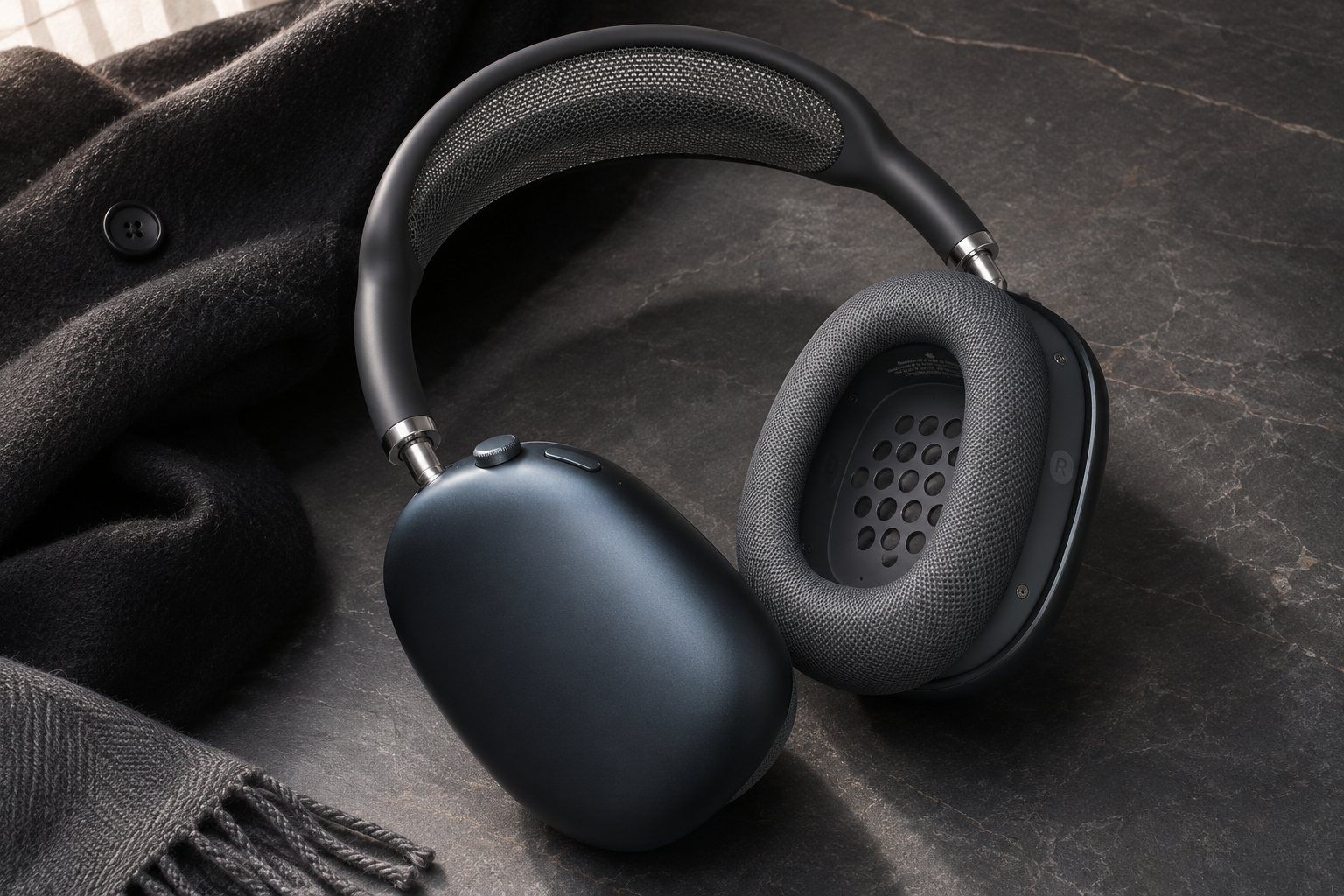
This image centers on dark over-ear headphones, combining black fabric, dark gray stone, and cool reflections on the headphone surface to create a low-saturation, urban display effect. To recreate a similar style, focus on limiting the number of colors and using texture differences to create layers.
Color Relationships in the Image
The headphone body is nearly black, with soft dark blue-gray reflections on the ear cups; the headband and ear pads have a more gray-black texture. The dark fabric in the background provides a soft, fluffy touch, while the stone surface offers a harder texture contrast. There are no bright color elements, so the visual focus is on the ear cup contours, metal connecting parts, and mesh headband.
This type of dark pairing works well with a few neutral colors as a buffer, such as charcoal gray, smoke gray, off-white, or cool silver. A pure black background may make the headphone edges less distinct; adding a piece of gray fabric or a textured dark gray surface helps bring out the volume of the ear cups.

Layering for Display
First, identify a main subject area, then use two different background materials for layering:
- Position the headphones in the center or slightly off-center, keeping the full headband and both ear cups visible.
- Place soft black or charcoal gray fabric behind or to the side, allowing natural folds but not covering the main structure.
- Use dark gray stone, a matte tabletop, or fine-textured board as the base, avoiding overly bright reflections that distract from the subject.
- Angle the metal arms, knobs, or connecting hinges toward the light source to create small highlights as visual rhythm.
- Keep background items minimal—at most one or two auxiliary textures—to avoid weakening the headphone silhouette.
If displaying with a case or protective cover, place the headphones in the foreground and move the case to the back, using the depth difference to suggest storage while keeping the image clean.
Outfit Pairing Suggestions
Dark headphones suit low-contrast, clean-lined outfits. Black knitwear, charcoal coats, dark blue jackets, or cool gray hoodies continue the cool tone of the image. For added depth, choose an off-white scarf, light gray knit cap, or silver metal accessories to prevent an all-black look.
For a more street-style combination, pair black or dark gray outerwear with loose straight-leg pants, then add small bright accents like off-white shoe uppers or silver zippers. For a quieter, minimalist effect, choose a black turtleneck with a dark gray coat and keep other accessories in matte textures.
Avoid adding high-saturation colors like bright red or neon green unless you intend the headphones as a dark accessory in strong contrast. If you must include a bright color, limit it to one spot such as socks, hat brim, or a small bag.
Photography and Placement Directions
Front flat lay best showcases the oval ear cups, headband curve, and side connection structures. A slight angle adds depth, making the light and shadow on the ear cups more pronounced; side display highlights knobs, metal hinges, and shell edges.
Light should come from the side and above, preserving soft highlights on the ear cup shells while avoiding direct light that causes overexposure. Details of dark objects rely mainly on edge lighting and texture contrast, so the background doesn't need to be completely black—keeping some gray texture actually makes the silhouette clearer.
Key Points for Styling Assessment
To judge whether a dark headphone display is cohesive, quickly check three things: are the headphones still the most prominent subject, does the background include both soft and hard textures, and do the outfit or auxiliary items only serve as complementary colors? As long as the main colors stay between black, charcoal gray, dark blue-gray, and a little light gray, the image will remain unified without being dull.